
Every child has a voice.
We help them share it.
A simple AAC app that helps children express their needs, feelings, and thoughts with ease.
One app, two people using it.
Your child gets a board they can read without reading. You get to see what they said.
A word for what they mean
Picture symbols grouped into eight categories, coloured by the kind of word they are, so children learn where to look long before they learn to read.






Calm by design
Nothing here competes with your child for attention.
- No ads
- No flashing
- No autoplay sound
- No data sold
See what they said today
Every word your child taps is counted, so progress stops being a feeling and starts being something you can look at.
Locked in their hands
A PIN keeps the board open and the settings shut, so a stray tap goes nowhere.
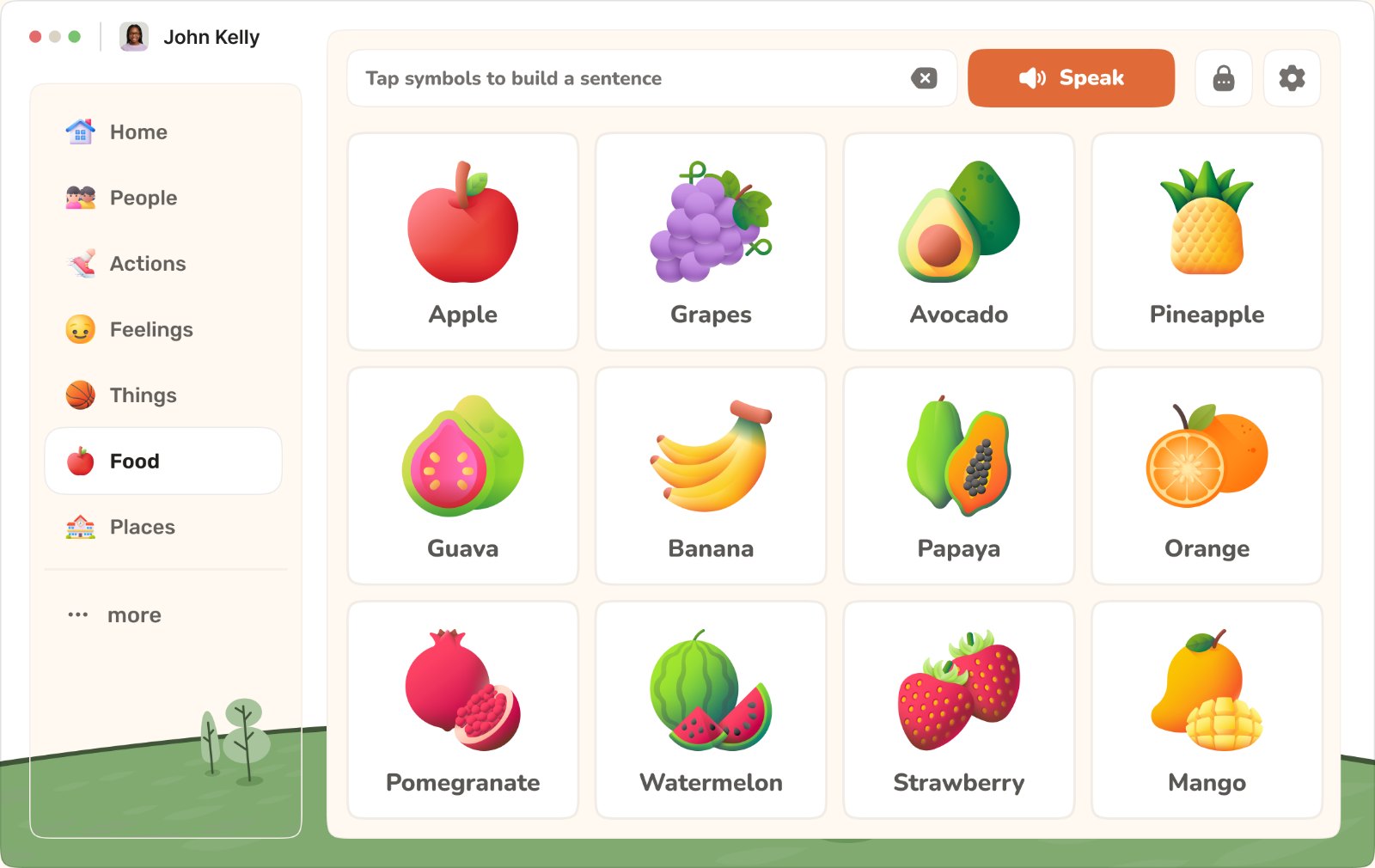
Three taps from quiet to conversation.
No reading required, and nothing to set up before the first word.
Tap a symbol
Big picture tiles, grouped by color. One tap is all it takes.
Build a sentence
Each tap adds a word to the bar. Tap a word again to take it back.
Pikabay AAC speaks
A clear voice says the whole sentence out loud, for everyone to hear.
Sixty-four words, eight tabs, one tap each.
Everything below is in the app today.
Coloured by the kind of word
Every tile carries the colour of its job in a sentence, so a child can aim at a colour long before they can read the label.
- Do16
- Food12
- Feel11
- Things8
- Places7
- People6
- Social4
A voice you can tune
Pick from the voices your device already has, then set the speed and pitch until it sounds right for your child.
Nothing to sign up for
No account, no email, no cloud. What your child taps is saved in the browser on that device.
Free, with our own symbols
The pictograms are the Visuals symbol library, drawn for Pikabay in one consistent style so a child reads every word the same way. All 5,509 of them ship with the app, searchable from the board. There is nothing to pay.
Pikabay AAC is coming to iPhone and iPad.
The same board, offline and full screen, so it works in the car, at the clinic, and anywhere the wifi doesn't reach.
Frequently Asked Questions
No. Open it and the board is already there with core words loaded. Adding your child's name and picking a board style takes about a minute, and you can do it later.
Yes. Every tile is a picture first, and the words are grouped by colour so children learn where to look long before they learn to read. Nothing on the board needs reading to use.
Research consistently finds the opposite: AAC supports speech development rather than replacing it. Speak to your speech and language therapist about how it fits your child's plan.
You can tune the voice, set a daily word goal, and switch between the eight word categories. A PIN keeps the board open and the settings shut. Rearranging tiles and adding your own words are not in yet, and they are next on the list.
Yes. Pikabay AAC runs free in your browser, with no sign-up and no ads. The symbols are our own Visuals symbol library, drawn for Pikabay, so there is no symbol licence to pay for.
Your child's boards stay on your device. There is no account to create, no tracking, and nothing is sold to anyone.
Give your child a voice today.
One minute to set up. Free to try.
Try Pikabay AAC free